Description
Motion Sensor Intelligence
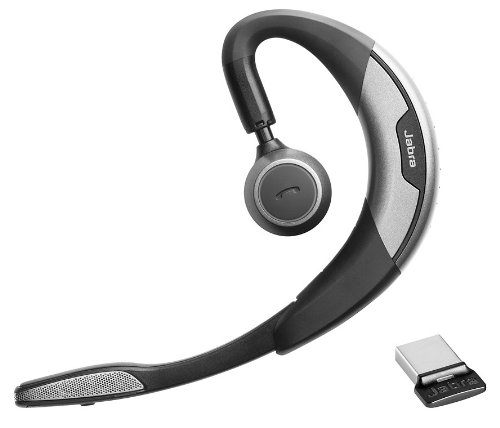
Jabra Motion UC is the ultimate headset featuring a unique intelligent motion sensor that allows you to effortlessly take or make that important call wherever you are. Featuring the best that the latest technology has to offer, Jabra Motion UC is above and beyond your expectations. With the built-in motion sensor and advanced microphones, the headset intelligently adapts the sound to your surroundings when you’re on-the-go or working in the office. The motion sensor also allows you to intuitively handle your calls – simply pick up the headset and put it on your ear to automatically answer a call.
Jabra Motion UC also lets you connect to practically any Bluetooth-enabled device, making it easy to seamlessly switch between your tablet, PC or smartphone. The headset comes with a USB adapter, which allows you to take or make internet calls via your PC and still be connected to you smartphone, tablet or other device. Your wireless freedom is thereby enhanced by a 10x longer Bluetooth range to you PC or laptop. Jabra Motion is really the only headset you’ll need for all your devices.
Jabra Motion UC has been designed with your personalized comfort in mind – with Jabra’s legacy of the behind-the-ear wearing style and unique height adjustment of the speaker tower, you can wear the headset in a way that makes you feel most comfortable. And when you’re done using it, simply fold the flip-boom arm and put the headset in your pocket to take it with you.
Jabra Motion UC also features NFC technology* for easy pairing – simply tap the headset on your smartphone* and you’re easily connected to take and make calls or stream your favorite multimedia – music, GPS and podcasts.
Connecting the Motion
Connecting with a Bluetooth Device
1. While pressing the Call button, open the flip boom-arm. Release the Call button when the Bluetooth light flashes blue.
2. Wear on the ear and follow the voice-guided connection instructions.
Connecting with the Jabra Link 360
1. Plug the Jabra Link 360 Nano Bluetooth USB adapter into any available USB port on your PC.
2. Open the flip boom-arm on the headset to connect to the Jabra Link 360.

EVGA GeForce GTX 1080 FTW2 GAMING, 8GB GDDR5X, iCX Technology - 9 Thermal Sensors & RGB LED G/P/M, 08G-P4-6686-KR
B&O Play Bang & Olufsen Beoplay H3 ANC
EVGA GeForce GTX 1080 Ti SC2 GAMING, 11GB GDDR5X, iCX Technology 9 Thermal Sensors & RGB LED G/P/M, Asynch Fan 11G-P4-6593-KR
DJI Agras T30 / T40 Intelligent Charging Station
SAMSUNG 85-inch Class Crystal UHD TU-8000 Series - 4K UHD HDR Smart TV with Alexa Built-in (UN85TU8000FXZA, 2020 Model)
Intel - Core i7-9700K Octa-Core 3.6 GHz Desktop Processor
Graco Ultra QuickShot Sprayer
HP OMEN 17.3" QHD(2560 x 1440) 165Hz Gaming Laptop, 14 cores 12th Gen Intel i7-12700H, GeForce RTX 3070Ti (TGP 150W), RGB Backlit KB, B & O, Wi-Fi 6E, Thunderbolt 4, Win 11 (32GB RAM | 1TB SSD)
MSI Trident X Plus 9SF-054US Gaming Desktop [i9-9900K][RTX 2080Ti VENTUS 11GB][32GB DDR4][512GB SSD + 2TB HDD
Harman/kardon - Onyx Mini Portable Wireless Speaker
Beats by Dr. Dre Solo Pro Wireless Noise-Canceling On-Ear Headphones (Dark Blue, More Matte Collection)
MSI GT75 TITAN i7-9750H/i9-9980HK RTX 2070/2080 17.3" FHD 144Hz/UHD 4k Laptop
Acer Nitro 5 Gaming Laptop 165Hz 15.6" QHD, AMD Ryzen 7 6800H 8-Core, GeForce RTX 3070 Ti 8GB, 32GB DDR5 RAM 1TB SSD, 4-Zone RGB Backlit Keyboard, WiFi 6E, RJ45, Windows 11+GM Mousepad
Shearwater Perdix AI Computer 


There are no reviews yet.